|
ENVI & Google PowerMeter
Google PowerMeter will show your energy data in graphical format that can be viewed on your iGoogle page. There are two ways that you can connect the Envi to Google PowerMeter:
Option A - Connect to computer using USB cable
Option B - Connect to router using WebBridge Device
Activate Google PowerMeter
OPTION A - USB Cable
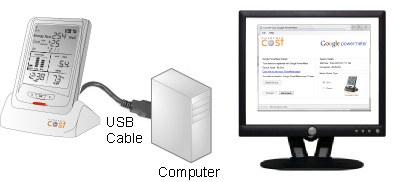
The USB cable connects the Envi to your computer and using Google PowerMeter software your computer will upload your energy usage information automatically to Google PowerMeter.
Installation Steps
- Download and install USB Cable driver software
- Connect Envi to an Internet connected computer using serial to USB Cable
- Download and install Current Cost PowerMeter software to your computer
- Register with Google
- Run program and energy data will upload automatically to Google PowerMeter
If you have...
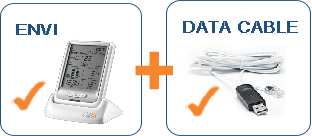
an Envi and the Envi USB cable you can Activate Google PowerMeter now!
. . . . . . . . . . . . . . . . . . . . . . . . . . . . . . . . . . . . . . .
OPTION B - Bridge Device
Available late September 2010
The WeB Bridge device connects the Envi directly to your router and will post data automatically to Google PowerMeter. The Envi Bridge will be available late September 2010.

Installation Steps
1. Connect Envi to the Web Bridge
2. Connect Web Bridge to a router
3. Register with Google
4. Data will automatically post to Google PowerMeter
WEB BRIDGE will be available late September 2010
. . . . . . . . . . . . . . . . . . . . . . . . . . . . . . . . . . . . . . .
Activate Google PowerMeter
The Current Cost PowerMeter software is a windows application that uploads energy data from the Envi monitor to Google PowerMeter using the Envi USB cable and an internet connection.
System Requirements
- Compatible with Windows XP, Vista and 7 for both 32 bit and 64 bit systems.
- 500 megahertz (Mhz) processor or higher, 256 MB RAM or higher.
- Broadband or DSL Internet connection.
Instructions:
- Download and install the USB cable driver software
- Download and install the PowerMeter software
- Register with Google
1. Driver Installation
- Download the appropriate Cable Driver Software
- Locate the extracted files on your desktop
- Double click pl2303.exe and follow the installation wizard
 Cable Driver Installation Guide Cable Driver Installation Guide
2. PowerMeter Software Installation
- Download PowerMeter Software
- Locate the extracted files on your desktop
- Double click Setup.exe and follow the installation wizard
Google PowerMeter Quick Start Guide
Google PowerMeter Installation Guide
3. Registering with Google PowerMeter
You will need to register with Google and have a Google login to use Google PowerMeter. If you already use the Google email service, Gmail, then you are already registered.
To register for a Google PowerMeter account, or for further details visit www.google.com/powermeter/about/
. . . . . . . . . . . . . . . . . . . . . . . . . . . . . . . . . . . . . . .
Suppor from Google
Google PowerMeter Support Forum
About Google PowerMeter
Privacy
The Current Cost PowerMeter application sends your Envi data to Google PowerMeter for processing. This process can be stopped at any time. For further details of the Google PowerMeter privacy policy, visit: /www.google.com/powermeter/privacy
Product Manufacturer: Current Cost
|